
Riley Is Now a ChatGPT Plugin
Your team already asks ChatGPT about their business every day. Until now, it answered without knowing your business.
Today, Riley, the business context layer for AI, is available as a plugin in ChatGPT. Install it once and ChatGPT can draw on your organization's customer, revenue, and business context when it answers.
Ask about your business where you already work
Mention Riley in any ChatGPT conversation and ask your question in plain language:
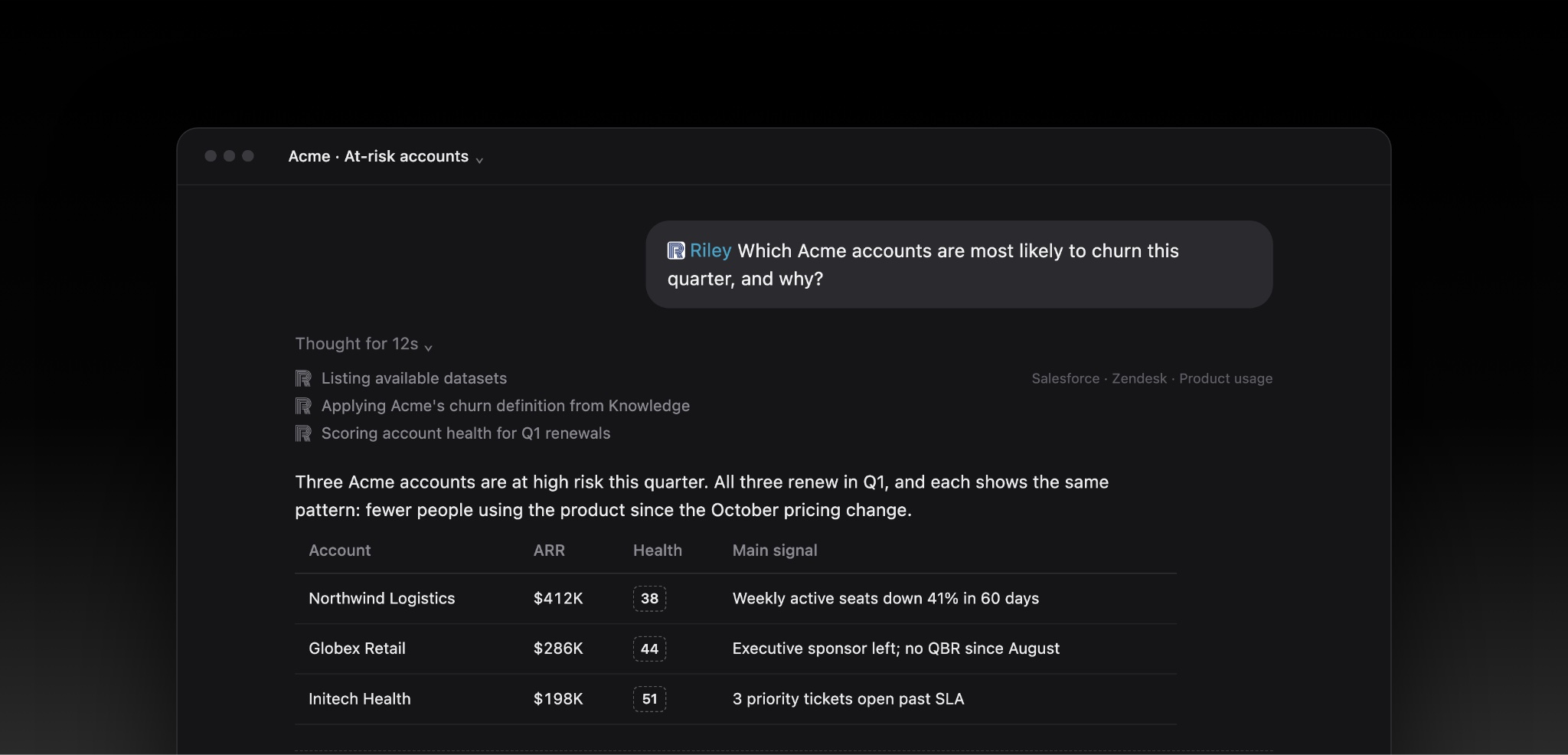
- "Which accounts are most at risk of churning this quarter, and why?"
- "What do our fastest-expanding customers have in common?"
- "How did revenue from our top segment change month over month?"
ChatGPT doesn't have to guess. It answers from Riley's understanding of your business: what your fields mean, how your tables connect, how your team defines its metrics, and the Knowledge and Personas you've already set up in Riley. Those answers can draw on the systems you've connected to Riley, such as Salesforce, HubSpot, Snowflake, Zendesk and Slack.
You don't have to export a CSV or paste in a dashboard screenshot. You don't have to explain your churn definition again.
The same context, now in every AI your team uses
Earlier this year we launched Riley MCP so that Claude, GPT, and other AI tools could connect directly to Riley. In September we made that context visible and controllable.
The ChatGPT plugin brings that same context layer to the place many of your teammates already work. When Riley's understanding of your business updates, every connected AI tool gets the update. That includes ChatGPT. (New to the idea? Read what a context layer for AI agents is, or why MCP alone doesn't make AI accurate.)
Governed by default
- Your permissions follow you. You sign in to Riley with OAuth, and the tools and data available in ChatGPT match your Riley permissions. Nobody sees more than they could in Riley.
- Riley sends context, not your whole dataset. It passes along what a question needs instead of uploading your data to a model.
- SOC 2 compliant. The plugin runs on the same SOC 2 compliant Riley platform. See the Trust Center for details.
- No purchases or payments happen through the plugin.
Get started
- Open the Riley plugin in ChatGPT.
- Click Install plugin and sign in with your Riley account.
- Start a chat, mention Riley, and ask about your customers and revenue.
The plugin requires an existing Riley account. Don't have one yet? Book a demo and we'll get your context layer running, or see how Riley works as an AI context layer.
Your team already chose its AI. Riley makes sure that AI understands your business.
FAQ
Does ChatGPT see all of my company's data?
No. Riley sends context, not your whole dataset: it passes along only what a question needs instead of uploading your data to a model. You sign in with OAuth, so ChatGPT can only use the tools and data your Riley permissions allow, and Riley is SOC 2 compliant.
Which data sources can ChatGPT use through Riley?
The systems you've connected to Riley, such as Salesforce, HubSpot, Snowflake, Zendesk and Slack. ChatGPT reaches them through Riley's context layer, so it uses your team's definitions and your Riley permissions rather than raw tables.
Do I need a Riley account to use the ChatGPT plugin?
Yes. The plugin requires an existing Riley account. If you don't have one yet, book a demo and the Riley team will get your context layer running.
What does ChatGPT use from Riley to answer?
Riley's understanding of your business: what your fields mean, how your tables connect, how your team defines its metrics, and the Knowledge and Personas you've set up in Riley.
Does Riley work with Claude and other AI tools too?
Yes. Riley MCP connects Claude, GPT and other AI tools to the same context. When Riley's understanding of your business updates, every connected AI tool gets the update.